Effects Units vs. Processors: Navigating the Sonic Landscape
In the intricate world of audio production, whether you're a seasoned sound engineer, a budding musician, or a live sound technician, you've undoubtedly encountered devices designed to manipulate sound. Two fundamental categories often cause confusion: effects units and processors. While the terms are sometimes used interchangeably, understanding their core differences is crucial for crafting compelling audio, achieving pristine mixes, and unlocking your creative potential. This article will demystify these tools, clarify their distinct roles, and explore the subtle overlaps that can sometimes blur the lines.
At its heart, an
effects unit is a device primarily used to enhance or add to a sound. It introduces new sonic textures, spatial dimensions, or tonal characteristics that weren't present in the original signal. An audio processor, on the other hand, is generally employed to correct, control, or refine the existing qualities of a sound. It focuses on shaping what's already there, rather than adding something entirely new. Grasping this distinction is the first step towards mastering your audio toolkit.
Unpacking the Fundamentals: What is an Effects Unit?
An
effects unit is an electronic device or software plugin that alters an audio signal and typically mixes this altered version with the original sound to create a desired outcome. The primary goal is often artistic expression or to mimic natural acoustic phenomena. Think of adding depth, space, movement, or an entirely new character to a sound.
Common examples of effects that you'll encounter in any studio or live rig include:
- Delay: Creates discrete repetitions of the original sound, ranging from quick slapbacks to long, echoing trails.
- Reverb: Simulates the natural acoustic reflections of a space, adding ambience and depth. This is arguably the most common effect used in live sound production.
- Chorus: Thickens a sound by duplicating it, slightly detuning, and delaying the copies, creating a shimmering, layered effect.
- Flange: Similar to chorus but uses shorter delay times and often creates a distinctive "swooshing" or "jet plane" sound.
- Pitch Shift (Detune): Alters the pitch of a sound, creating harmonies or subtle detuning for a thicker sound.
- Artificial Double Tracking (ADT): Mimics the effect of a performer recording the same part twice.
Some effects, like reverb and delay, aim to reproduce natural soundscapes, while others, such as extreme flange or reverse reverbs, are purely for artistic, transformative purposes.
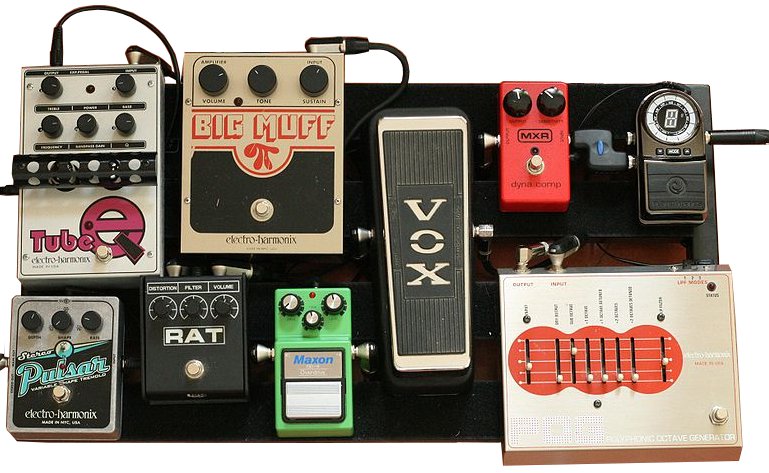
Physically, an effects unit can take many forms. In professional studio and live sound environments, you'll often find them as 19-inch rack-mounted boxes with knobs, buttons, and digital displays. However, the world of guitarists and bassists has popularized individual effects pedals – compact units designed to sit on the floor and be controlled by foot. Multi-effects pedals combine several effects into one convenient unit, allowing performers to craft complex signal chains. Whether it's a dedicated stompbox for a single effect or a comprehensive multi-effects processor, the core function remains adding to or enhancing the original sound. For a deeper dive into specific effects, check out our article
Mastering Audio Effects: Delay, Reverb, Chorus Explained.
Most modern effects units, whether hardware or software, rely on digital signal processing (DSP) to achieve their results. They convert the analog audio into digital data, apply complex algorithms (often involving delays combined with modulation or filtering), and then convert it back to an analog signal. This digital approach allows for immense versatility and precision.
Demystifying Processors: Control and Correction
In contrast to effects, audio processors are primarily tools for correcting, shaping, or controlling the inherent qualities of an audio signal. Their main purpose is not to add something new, but to modify what's already present. Processors typically treat the entire sound passing through them, working "in line" with the signal flow.
Key examples of audio processors include:
- Equalizers (EQ): These allow you to boost or cut specific frequency ranges, shaping the tone of an instrument or voice. This includes everything from basic bass/treble controls to complex parametric EQs.
- Compressors: Reduce the dynamic range of a signal by making loud sounds quieter and/or quiet sounds louder, resulting in a more controlled and consistent output.
- Limiters: A specialized type of compressor that prevents the audio signal from exceeding a set maximum level, crucial for protecting equipment and preventing digital clipping.
- Expanders: Increase the dynamic range by making quiet sounds even quieter, often used to reduce unwanted background noise.
- Noise Gates: Eliminate sounds below a certain threshold, effectively "gating" out unwanted noise when the main signal is absent.
Processors work by amplifying or attenuating specific components of the sound that *were already there*. For instance, an EQ doesn't add a new frequency; it makes an existing frequency louder or softer. A compressor doesn't introduce a new sound; it simply adjusts the volume dynamics of the existing signal. They are indispensable for achieving clarity, balance, and punch in a mix.
The Blurring Lines: Where Effects and Processors Overlap
While the core distinction between effects (enhancing/adding) and processors (correcting/controlling) is clear, the real world often presents scenarios where the lines can get a little hazy. The most common point of confusion arises with multi-effects units, which frequently incorporate dynamic processing tools like EQ and compression alongside traditional effects.
Consider a wah-wah pedal. Is it an effect or a processor? It functions as a dynamically controlled filter (a type of EQ), which technically falls under processing, as it modifies existing frequencies. However, its primary use is often for artistic expression and dramatic flair, which aligns with the purpose of an effect. This example perfectly illustrates the nuanced nature of audio tools. The context and *how* a device is used often dictate its classification.
To reiterate the fundamental distinctions:
- Purpose: Effects *enhance* or *add to* a sound; processors *correct* or *control* a sound.
- Signal Flow: Effects are typically *mixed with* (parallel processing) the original sound via auxiliary sends, allowing for a dry/wet blend. Processors are often used *in line* (serial processing) to treat the whole sound.
- Methodology: Effects work by *adding something that wasn't there* (e.g., reflections, copies, pitch shifts). Processors work by *amplifying or reducing some or all of what was already there* (e.g., frequencies, dynamics).
Understanding these core differences will empower you to make informed decisions about which tool to reach for when shaping your sound.
Practical Application: Using Effects and Processors Effectively
Knowing the difference between effects and processors is one thing; applying that knowledge practically is another. The correct integration of these tools into your signal chain is paramount for achieving professional results.
Connecting Effects Units
Most modern effects units are designed to be connected using a "send/return" loop from your mixer or audio interface. For instance, in a live sound setup, you would typically use a post-fade auxiliary send (AUX send) from your mixer. This routes a copy of the channel signal to the input of the
effects unit. The unit processes this copy, and its output is then routed back into a dedicated effects return input on the mixer.
The "post-fade" aspect is crucial: it means the amount of signal sent to the effect tracks the channel's fader level. If you turn down a vocal track, the amount of reverb on that vocal also decreases proportionally, maintaining a consistent mix balance. While many mixer channels handle mono sources, most effects units allow for mono input and stereo output, creating a wider, more immersive effect. This parallel processing approach allows you to precisely control the "wet" (effected) signal's level independently of the "dry" (original) signal.
Integrating Audio Processors
Audio processors, by contrast, are almost always inserted directly "in line" or "serially" into the signal path. For example, a compressor or EQ would be inserted directly into a single channel strip on a mixer or DAW. This means the *entire* signal for that channel passes through the processor before continuing down the signal chain. This direct insertion allows the processor to treat the whole sound, fundamentally altering its characteristics before it reaches subsequent stages like effects sends or the main mix bus. Processors are critical for foundational sound shaping – cleaning up individual tracks, evening out dynamics, or ensuring instruments sit well in a mix.
Tips for Effective Use:
- Start Simple: Especially if you're new to effects units and processors, begin by understanding one effect or processor thoroughly before combining multiple.
- Read the Manual: Modern digital units, whether hardware or software, offer immense depth. The manual is your best friend for unlocking their full potential.
- Listen Critically: Train your ears. What specific problem are you trying to solve, or what enhancement are you trying to achieve? Avoid simply adding effects or processing for the sake of it.
- Less is More: This adage is particularly true for effects. Subtle application often yields more professional and impactful results than drowning a sound in reverb or delay. Over-processing can quickly lead to a muddy or unnatural sound.
- Experiment: Don't be afraid to break the "rules" and try unconventional approaches. Creativity often springs from experimentation.
- Context is King: The application of effects and processors will differ significantly between live sound (where intelligibility and feedback are concerns) and studio recording (where meticulous sound design and layering are often prioritized).
For guitarists and other instrumentalists, understanding how to chain multiple pedals – a mix of effects and processors – can dramatically shape your signature sound. If you're looking to dive deeper into the world of creative sound manipulation with hardware, our guide
Unlock Your Sound: The Power of Effects Units and Pedals offers valuable insights.
Conclusion
The journey through the sonic landscape of audio production is enriched by a clear understanding of your tools. Effects units and processors, while sometimes overlapping in functionality, serve fundamentally different purposes. Effects are for artistic enhancement and adding new dimensions, typically mixed in parallel. Processors are for corrective shaping and control of existing elements, usually inserted serially. By respecting these distinctions and applying them thoughtfully, you'll gain greater control over your sound, enabling you to create clearer mixes, more impactful performances, and truly unleash your creative vision. Experiment, listen, and let your understanding of these core differences elevate your audio endeavors.